×
![Modal Image]()

A Different Way to Experience Progress
Most productivity apps rely on numbers. They track minutes completed, sessions started, streaks maintained, goals achieved, and tasks checked off. Those metrics can be useful, but they often feel transactional: users invest attention, receive a statistic in return, and move on to the next task.
When we began working on Flower Focus, we asked a different question: what if progress could be experienced rather than measured? What if focus was not represented by a chart, percentage, or streak counter, but by something that visibly grew over time?
That simple idea became the foundation of the product. Every focus session begins with a seed. As users concentrate, the seed gradually transforms into a flower. Growth happens in real time, creating a direct visual connection between attention and progress. When the session ends, the flower does not disappear. It becomes part of a persistent garden that continues to evolve over days, weeks, and months.
Over time, users are not simply collecting completed sessions. They are cultivating a landscape built from their own commitment and consistency.
Making Focus Visible
The central challenge behind Flower Focus was not only technical. It was psychological. Focus is difficult because its rewards are often invisible. A productive hour can feel remarkably similar to an unproductive one while it is happening. The benefits usually appear later, sometimes days or weeks after the effort has been invested.
Traditional productivity tools try to close that gap with statistics and visualizations. Flower Focus takes a more emotional route: it turns effort into growth. The flowers were never intended to be decorative rewards layered on top of an existing timer. They became the productivity system itself. Growth became feedback. Blooming became an achievement. The garden became a record of consistency.
Creating that feeling required a shared visual and motion language. Each flower needed its own silhouette and personality, but all flowers had to belong to the same ecosystem. Every species follows a recognizable lifecycle, progressing from seedling to bloom before settling into a calm resting state. Once fully grown, flowers continue to exhibit subtle breathing and movement patterns that keep the garden alive without becoming distracting.
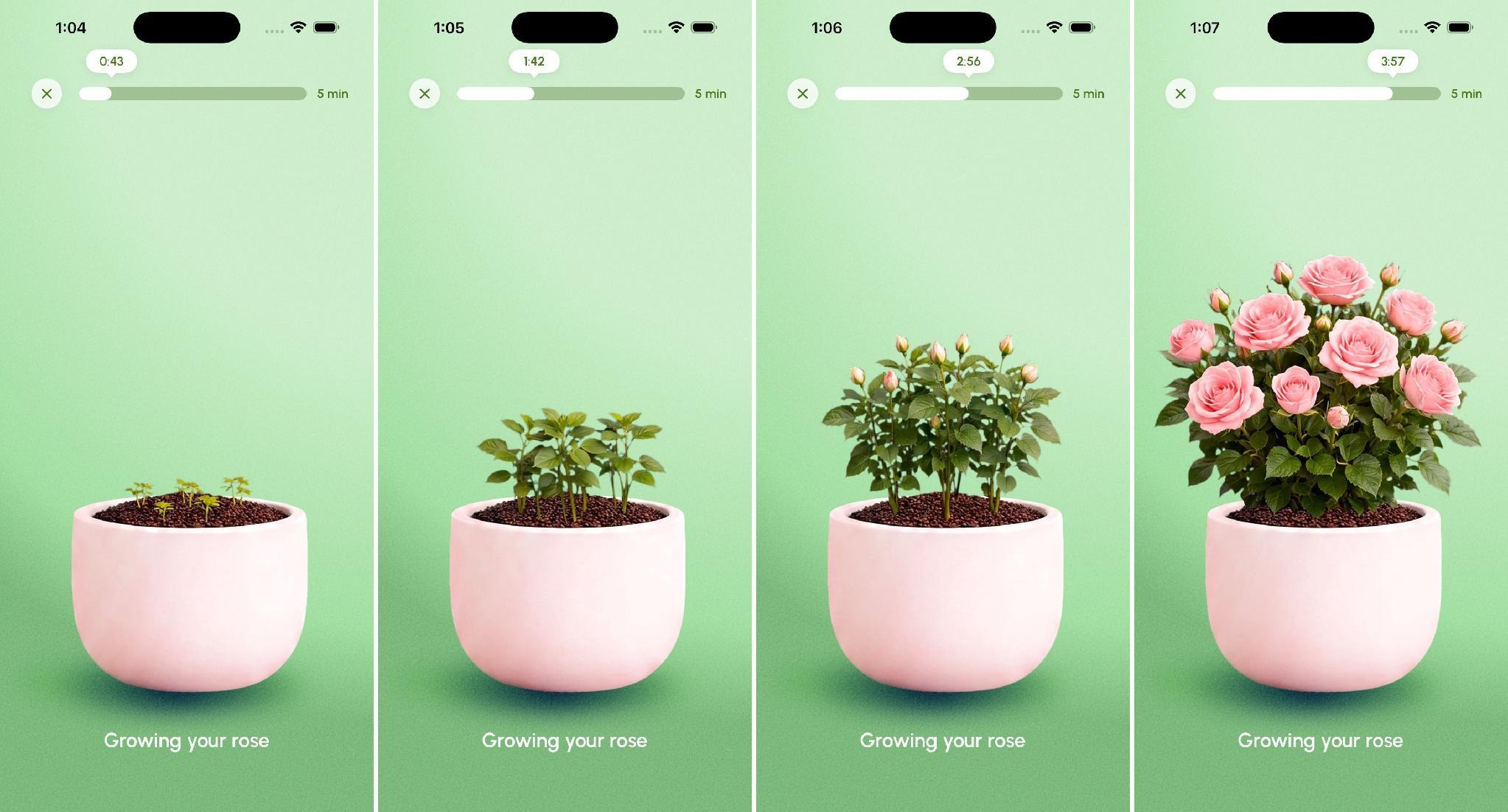
Growing stages for a rose: progression is continuous, not a separate reward screen
Designing a Garden, Not a Reward System
The flower is only part of the experience. The garden is where those flowers begin to tell a larger story. When a focus session ends, the newly grown flower is planted into a persistent environment that evolves alongside the user. Individual sessions become visible contributions to a larger landscape.
This apparently simple concept introduced a number of product, design, and engineering challenges. The garden needed to feel personal without becoming chaotic. It needed to evolve continuously without overwhelming users. Most importantly, it needed to create continuity between sessions that might be separated by days, weeks, or even months.
Three principles guided the system: clarity, calmness, and continuity. Users needed to understand how their actions influenced the environment. The space needed to support focus rather than compete with it. And every new flower needed to feel connected to everything that came before.
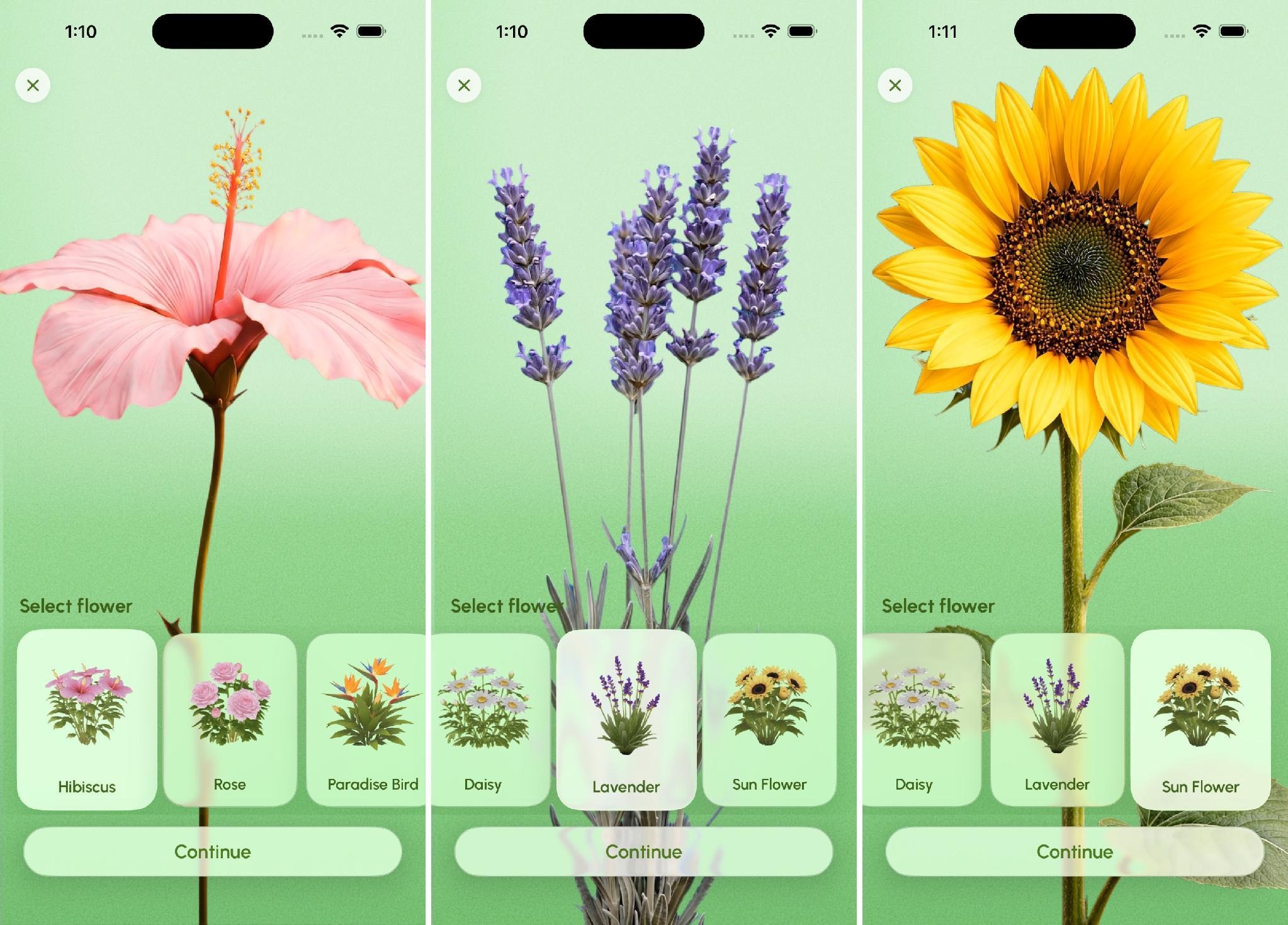
The flower picker gives each plant a distinct personality while preserving one shared visual language
From a technical perspective, this required a state-driven architecture rather than a static scene. Instead of relying on one pre-built environment, the garden is assembled dynamically from modular elements. Flowers, decorative content, environmental details, and progression milestones are generated according to user state and placement data. This makes every garden unique and allows the experience to expand naturally over time.
Using AI as the Beginning, Not the End
One of the most interesting aspects of Flower Focus was how artificial intelligence entered the creative process. The application required a large collection of flowers, each with its own silhouette, visual identity, and production-ready behavior. Creating that variety entirely through traditional modeling workflows would have required substantial production time.
Rather than treating AI as a replacement for artists, the team approached it as a tool for accelerating exploration. Tripo AI became part of the asset creation pipeline. The first results were impressive: within minutes, the team could generate flower concepts with rich detail, organic structures, and distinctive forms that would have taken much longer to build from scratch.
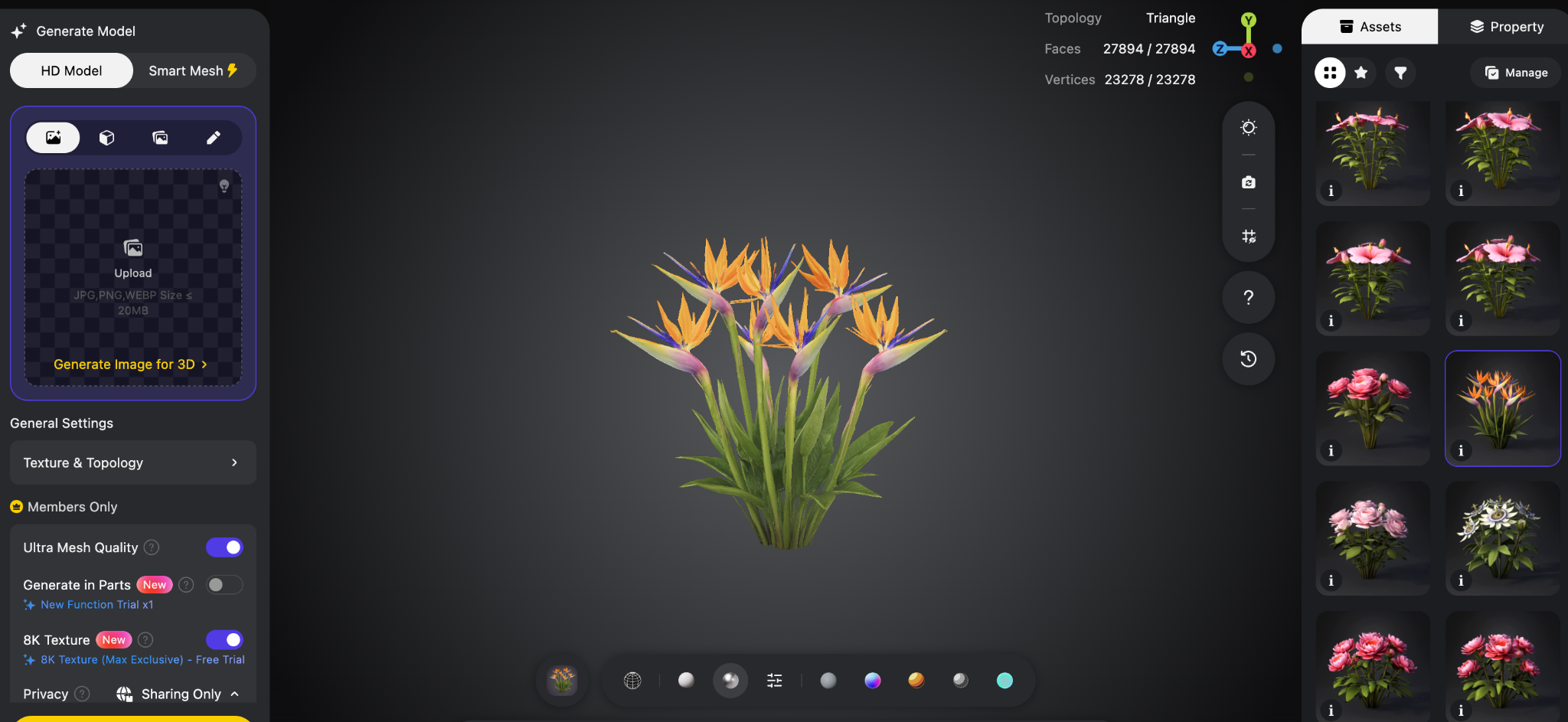
Tripo AI exploration for a Bird of Paradise model
However, the same generated models revealed a familiar limitation in AI-assisted workflows. They looked good, but they were not ready for production. Many contained dense geometry and complex mesh structures that would have created unnecessary performance costs on mobile devices. Visual quality had been optimized, but runtime efficiency had not.
The solution was to treat AI-generated assets as the beginning of the process, not the finished content. Each flower moved through a pipeline that combined AI generation with traditional 3D production techniques. Models were evaluated for silhouette quality and artistic appeal before being retopologized, simplified, optimized, and prepared for animation. Materials were refined, textures optimized, and assets validated repeatedly on real devices before being approved for production.
The lesson was clear: AI can dramatically accelerate exploration, but craftsmanship remains essential. The quality of the final experience depends not on generation alone, but on what happens afterward.
Making the Environment Feel Alive
One of the most revealing moments during development came from a surprisingly ordinary element: the grass. A simple textured ground plane would have fulfilled the functional requirements of the application. Flowers would still grow. The garden would still exist. The feature would technically work. Yet something felt missing: the environment lacked life.
That observation led to a deeper exploration of how subtle environmental systems influence perception. Rather than treating the ground as a static surface, the team built it as a layered visual system combining shader techniques, spatial stratification, and procedural movement. Wind-driven vertex deformation introduces continuous motion throughout the scene. Height-based gradients and controlled color variation create depth without requiring expensive geometry.
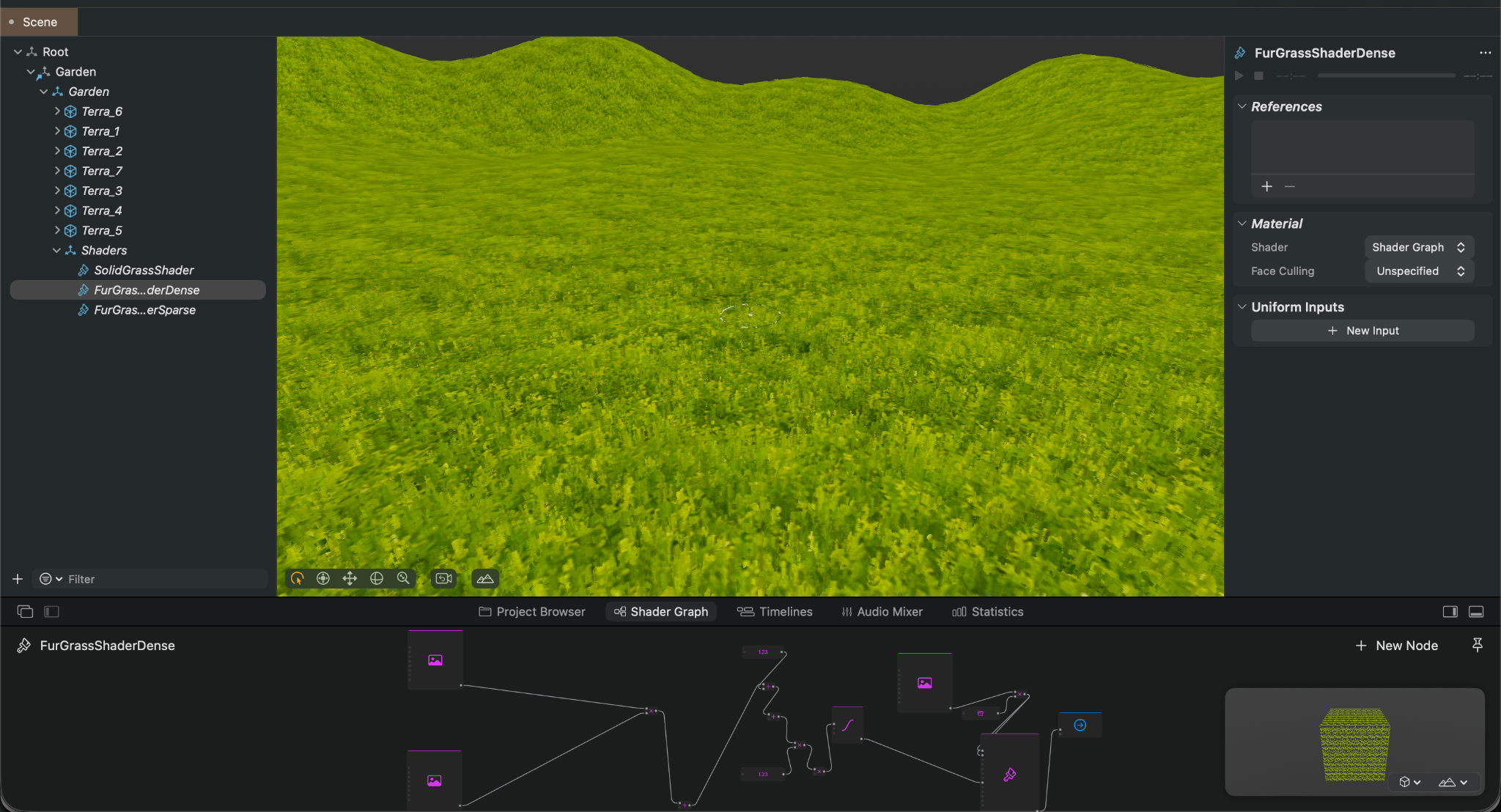
Shader-driven grass and layered environment work make the garden feel alive without overloading the device
Individually, these details appear minor. Collectively, they transform the environment. The garden no longer feels like a collection of objects placed onto a surface. It begins to feel like a living space.
Performance as a Product Feature
As the garden evolved, performance became increasingly important. Flower Focus combines animated flowers, shader-driven vegetation, persistent progression systems, environmental effects, and long-term content growth. Each of these features contributes to the overall experience, but each also introduces potential performance costs.
Rather than treating optimization as a final development phase, performance was handled as a product requirement from the beginning. AI-generated assets were aggressively retopologized to remain mobile-friendly. Geometry budgets were established early and enforced throughout production. Texture usage was controlled to reduce memory pressure. Animation systems were profiled continuously so visual richness would not compromise responsiveness.
The team also implemented scene lifecycle controls that pause inactive systems when they are no longer visible, reducing unnecessary processing. Asset preloading strategies minimized visible loading interruptions, while battery and thermal testing helped ensure stability during longer focus sessions.
These efforts were not purely technical. Flower Focus is designed around calmness. Users should be able to focus on their work without becoming aware of the systems operating behind the scenes. Smooth performance is therefore part of the emotional experience. A garden cannot feel peaceful if the application itself feels unstable.
Extending the Workflow: Presenting Flower Focus with AI
The same philosophy later appeared in a different part of the project: App Store presentation. Once Flower Focus had a clear product identity, the team explored whether AI could also help generate polished App Store screenshots from simulator captures, product messaging, and a consistent visual system.
App Store screenshots may look like a small production detail, but they are often one of the most important parts of a product's first impression. Before users open the app, they see the product page. The screenshots need to explain the benefit quickly, show the app in a strong visual state, and maintain a consistent design language across the full set. That combination is harder than it looks. It requires clear copy, good source screenshots, careful layout, correct export sizing, and enough polish to feel trustworthy.
To test whether AI could support this process, the team experimented with an open-source Claude Code skill for App Store screenshot generation. The tool runs from the terminal inside the iOS project directory and guides the user through a multi-step workflow. It does not simply generate images from a prompt. Instead, it tries to move through the same decisions a team would normally make manually: what benefits should the screenshots communicate, which app screens best support those benefits, and how should the final App Store images be composed.
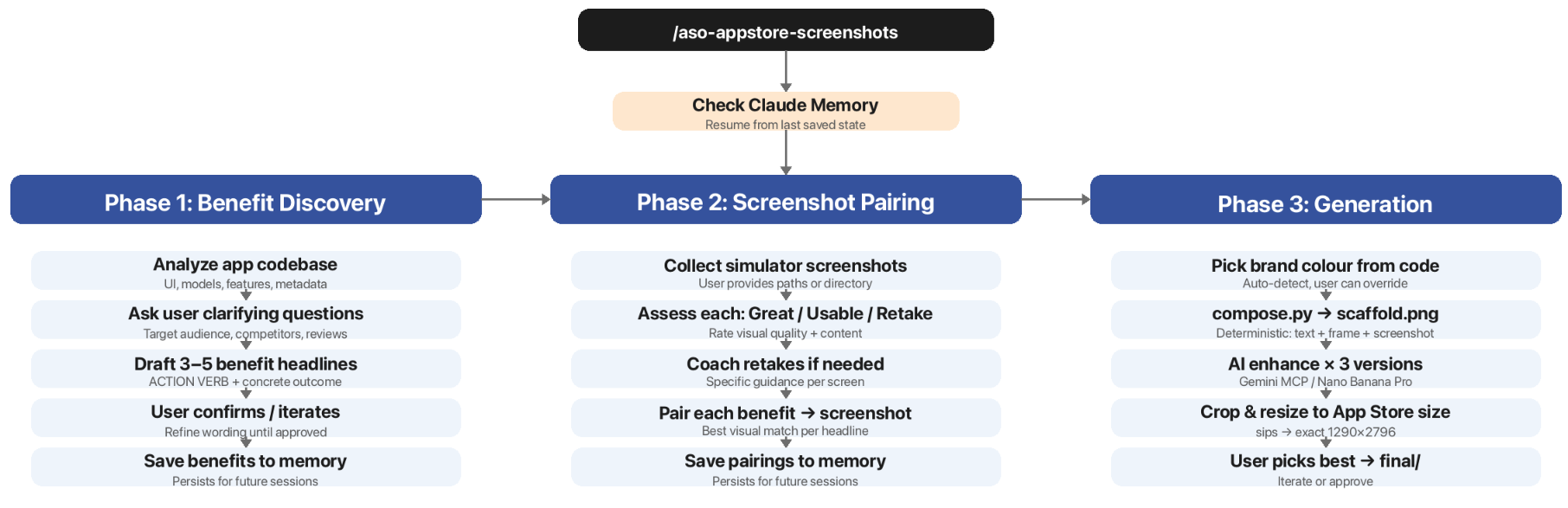
The App Store screenshot workflow: benefit discovery, screenshot pairing, and generation
Phase 1: Benefit Discovery
The first phase is benefit discovery. The tool analyzes the app codebase, including UI, models, features, and metadata, then asks clarifying questions about the product, audience, and positioning. Based on that context, it drafts a small set of benefit-driven headlines. The strongest part of this step is the way it pushes the messaging toward concrete outcomes. Instead of vague copy, the tool encourages direct, action-oriented benefit lines that tell users what they can actually do or gain.
Phase 2: Screenshot Pairing
The second phase is screenshot pairing. The user provides simulator screenshots, and the tool evaluates each one using a practical quality rubric: Great, Usable, or Retake. This is not only a pass/fail check. For weak screenshots, it gives specific retake guidance: which screen should be shown, what state the app should be in, how much content should appear on screen, and whether visual details such as the status bar or empty states are hurting the result. After the screenshots are reviewed, the tool pairs each benefit headline with the screen that best supports it.
Phase 3: Generation
The third phase is generation. This is the most interesting part of the pipeline technically. Rather than asking an AI image model to invent a finished App Store screenshot from scratch, the tool first builds a deterministic layout in code. A Python script creates a scaffold image with the core structure already locked in: headline placement, phone frame, screenshot position, spacing, and composition. Only after that scaffold exists does the workflow send it to an AI image model to generate polished visual variants.
This scaffold-then-polish approach was the strongest idea in the experiment. Fully AI-generated marketing images can drift easily. Typography can change. Phone frames can move. Layouts can become inconsistent from one screenshot to another. Visual details can stop matching the actual product. By locking the structure in code first, the workflow keeps the set consistent. AI is then used where it performs better: adding visual richness, atmosphere, and variation on top of a controlled base.
The generation step also produces multiple variants rather than a single output. That matters because AI image generation is still unpredictable. Sometimes one result is too busy, too generic, or slightly off-brand, while another is much closer to what the team needs. Generating several options and letting a human choose the strongest one is a practical way to absorb that variance instead of pretending it does not exist.
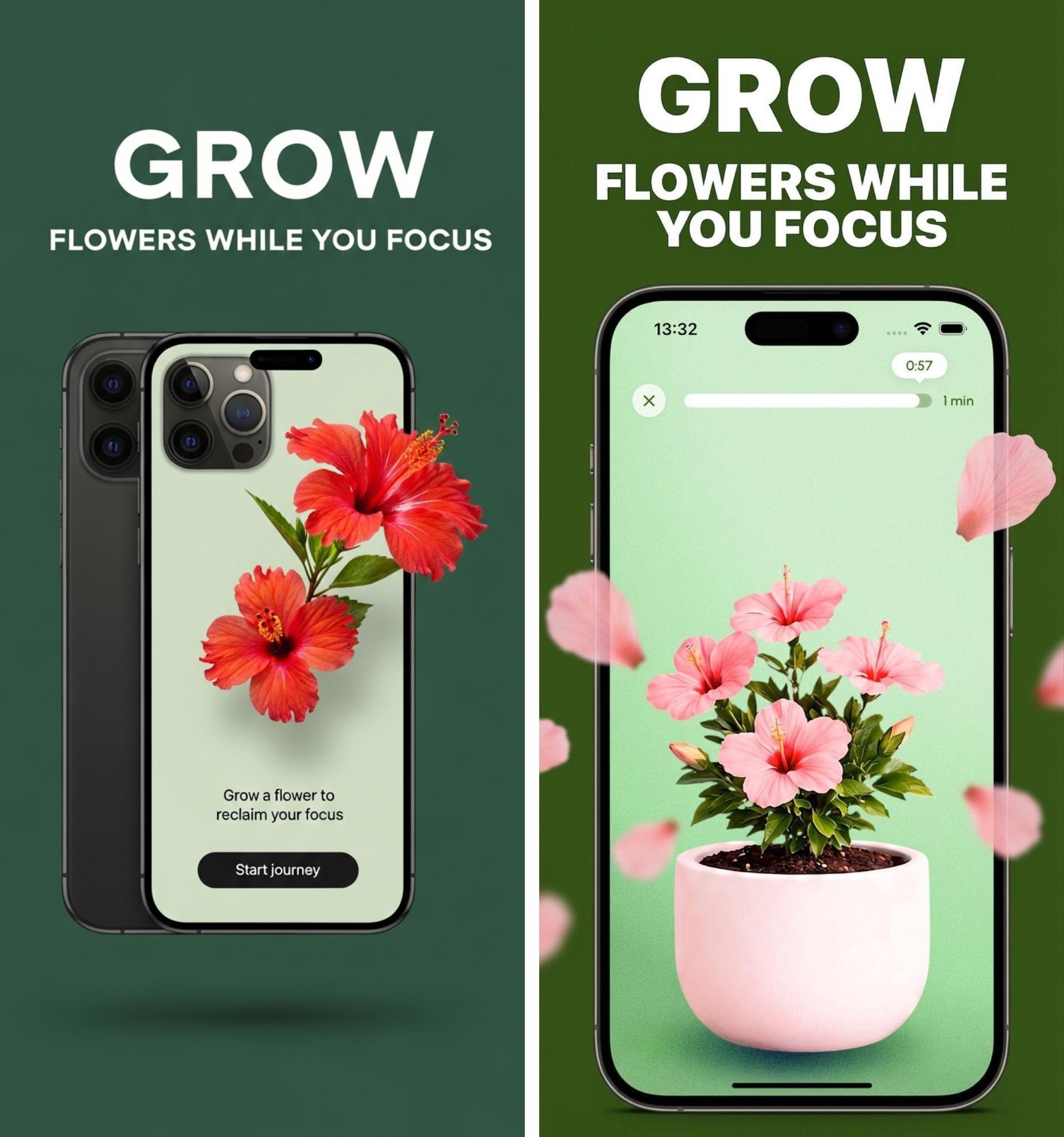
Two generated App Store directions from the research: the strongest results came from better inputs, clearer headlines, and human selection
Two Runs, Two Very Different Outcomes
The team ran the process twice, with very different results. The first run produced rough outputs that were not strong enough to ship. The second run was a clear improvement, and the difference came less from the tool itself than from how it was used.
The second run worked better because the inputs were better. The team used cleaner simulator screenshots, with fuller and more representative app states instead of sparse or empty screens. They followed the tool's retake guidance more carefully. They iterated more seriously on the benefit headlines instead of accepting the first draft. They also treated the rating step as a real quality gate, not just a formality before generation.
That made the lesson very clear: this is a garbage-in, garbage-out workflow. AI can accelerate production, but it cannot compensate for weak source material, unclear messaging, or careless review. Better screenshots, sharper copy, and more disciplined intermediate decisions directly improved the final result.
Limitations of the Full Pipeline
The experiment also exposed real constraints. The tool is developer-oriented by design. It runs through Claude Code, inside the app's codebase, and depends on local scripts, terminal usage, simulator screenshots, and external image-generation services. When something breaks, especially around the connection to the AI image model or the local generation pipeline, the person using it needs enough technical knowledge to troubleshoot. That makes the workflow harder to hand over to the marketing or design teams that would normally own App Store presentation.
It is also tied to a Mac-based workflow. The pipeline depends on Apple-specific tooling and fonts, including the use of SF Pro Display Black for headlines and sips for cropping and resizing. That makes sense for an iOS App Store screenshot workflow, but it also means the process is not easily portable to non-Mac environments.
There was another limitation specific to how our team already works. Some parts of the tool solve problems we may not need it to solve. Benefit headlines can often be pulled from approved website or landing-page messaging. Screenshot selection can often be done quickly by product, design, or marketing teams with a trained eye. In that context, the full end-to-end pipeline can feel heavier than necessary.
What We Would Keep
The full App Store screenshot pipeline may be more machinery than every team needs. It is developer-oriented, Mac-only, and partly redundant if marketing copy and screenshot selection already exist elsewhere. But several ideas are worth keeping beyond this specific tool:
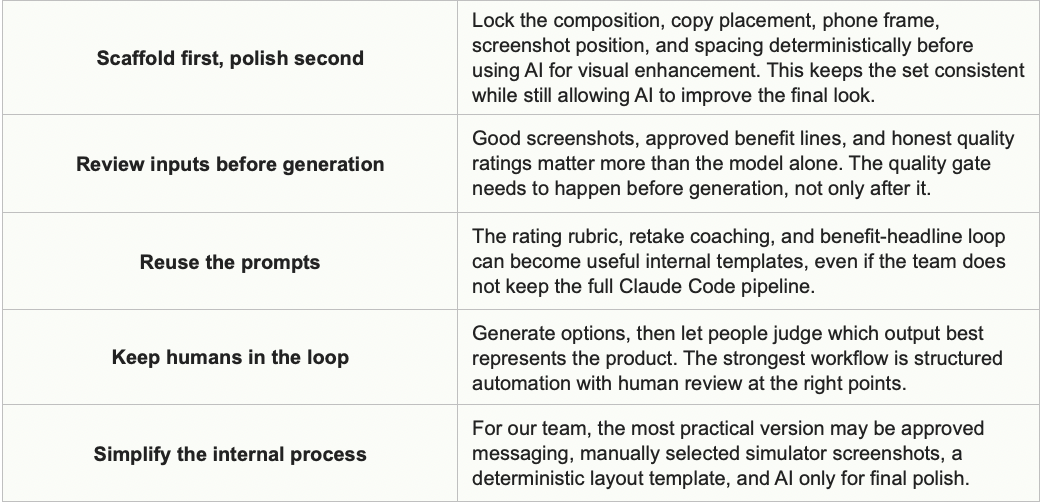
This mirrors the lesson from the flower asset pipeline. In both cases, AI worked best as the beginning of a structured process, not as the final answer. For the flowers, AI helped generate visual directions that were later evaluated, retopologized, optimized, animated, and validated on real devices. For the App Store screenshots, AI helped explore polished presentation options, but only after the message, layout, and screenshots had been prepared with care.
The broader lesson is that AI becomes most useful when it is constrained by good systems. It can accelerate exploration, generate variations, and reduce manual production time. But the final quality still depends on clear inputs, deterministic structure, technical discipline, and human judgment.
Building Across Disciplines
Flower Focus was never only an engineering project or only a design project. The concept demanded collaboration. Designers established the emotional framework, progression systems, and visual language of growth. Artists transformed those ideas into flowers, animations, and environmental assets. Engineers built the systems responsible for persistence, rendering, animation, progression, and runtime performance. Product and QA teams validated both the technical and emotional aspects of the experience.
Rather than operating as separate phases, these disciplines formed a continuous feedback loop. Visual decisions influenced engineering systems. Technical constraints informed design choices. Product goals shaped both. The result feels cohesive because no single discipline operated in isolation.
What Flower Focus Taught Us
Looking back, Flower Focus is a productivity application, but the project also reveals something broader about modern product development. The most meaningful experiences rarely emerge from a single technology. They emerge when multiple disciplines work together in service of a clear human goal.
Artificial intelligence accelerated content creation. 3D workflows brought visual identity to life. Animation systems created progression. Mobile engineering ensured reliability and performance. Product design shaped the emotional journey. AI-assisted App Store experiments helped explore how that journey could be presented to users before they even opened the app.
Yet none of those elements would have mattered if they had been disconnected from the core idea that inspired the project in the first place: people want to see their progress, not simply measure it.
Every flower that blooms represents a completed session. Every plant added to the garden represents time invested in meaningful work. Every evolving landscape reflects a history of attention and consistency that would otherwise remain invisible.
The technology exists to make that progress visible. And, like the best digital experiences, the most successful moments are the ones where users stop noticing the technology altogether and simply enjoy watching something meaningful grow.